Showing posts with label technology. Show all posts

Tuesday, November 29, 2022

Mathigon & Polypad & Puzzles...Oh My!

I have been a fan of Mathigon's Polypad for quite a while now, and have found many great ways for it to be used to help students build better mathematical understanding as well as to challenge their current understandings.

I want to share a few of the great resources available on Mathigon in hopes that you will find ways for them to work for you and your students!

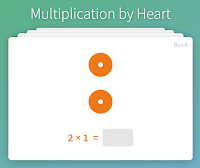
The Multiplication by Heart cards (created by Math for Love) are great visual practice for students as they learn to understand and master their multiplication facts.  

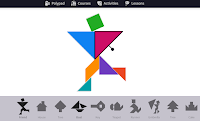
Of course, I also enjoy the Tangram  Builder which is located in the Activities section.

Exploding Dots can also be found here.  If you have not spent time in the Exploding Dots world by James Tanton, do yourself and your students a favor!  It would make for a great exploration for your students.  The Exploding Dots experience on Mathigon is an extension of the actual website, but still one to get you thinking.

What really got my attention on Mathigon is its Polypad section!  It has so many unique manipulatives and tools to offer your students.

This polypad includes a balance scale and fraction bars. Each could be used separately.


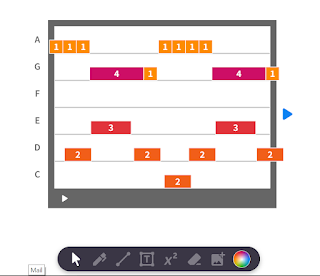
Students can make music using these tools found in Polypad.


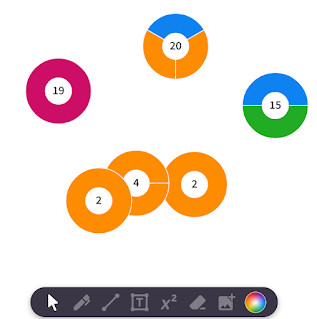
These Prime Factor Circles are a match to Prime Climb and can be decomposed (if composite) or combined as you wish to create new products.


This is just the tip of the iceberg in this fabulous site.  You can save and link activities that you make within the Polypad, but you can also use some of the many that are already prepared.  One last thing to explore is the Lessons tab.  Inside of there you will find your way to a variety of puzzles and explorations for you and your students.

Take the time for your students and yourself to explore this site.  You won't be disappointed!


Saturday, October 17, 2020

So much good in one place!


Many of you are familiar with the beauty of Splat! and all that it can offer our students.  It also has the great quality of being a routine that can be used throughout school.  It is certainly a routine that students, teachers, and this math specialist love due to its visual qualities, critical thinking elements, and engaging ways!

But the master behind Splat! has many other great resources available to teachers.  They are opportunities to expose our students to many concepts and to encourage some rich discourse in our classrooms.  And, best of all, Steve Wyborney shares his wonderful creations with us in the form of free downloads.

These resources are good in a normal year, but this year, they are especially nice to use in a virtual learning format.

Here is a run-down of some of the things you can find from Mr. Wyborney:

Splat!:  Beginning with concept of missing addends, the Splat slides move from primary concepts to fractions and algebra as the slides become more complex.  Students benefit from the visual nature of the slides, and they love the game feel of it all.

Esti-Mysteries:  Another popular routine with students, esti-mysteries merge the skill of estimation with critical thinking.  One clue is revealed at a time so that students can narrow down their choices.  In the end, they still depend upon their estimating skills for a final decision.  One thing I like about this routine is that once it has been taught, I think it can be used in many ways including revealing a clue a day with the final discussion occurring at the end of the week.

Estimation Clipboard: This is one of my favorites!  This routine again builds off of the concept of estimating and makes it fun for students to take the risks when making an estimate.  An image is shown, students make an estimate, and then the answer is revealed. Another slide is shown with a change in the image, and the students adjust their estimate.  This simple routine has hidden sophistication in that it often has hidden benchmarks for students to use to be able to make a better estimate.  Many of the images are about number, but I especially recommend the slides that deal with length.

Cube Conversations:  These 3D images are a great way for students to get an introduction to volume and to build their visual and grouping skills.

Tiled Area Questions:  Beginning as general area problems, these develop into more complex relationships between whole and fractional numbers.  Again--an opportunity to stretch our students' thinking and their abilities to justify their thinking.

His animated multiplication chart is a nice tool for students to explore patterns and be exposed to their facts.

I know that for many of you Splat! is a common routine used in your classroom, but I wanted you to be aware of some of the many other treasures that you can find on this website.  If the past proves anything, I would bet we can look forward to other great ideas to be created by him in the future!  Have fun exploring this awesome sight, but more importantly, have fun watching your students think, engage, and discuss mathematics in such fun ways!

Sunday, May 17, 2020

Looking for Virtual Manipulatives?

While we are still unsure how our instruction will be delivered in the fall, there is one thing we are sure of....student's involvement in the concrete phase of learning math is important!

Sending home concrete manipulatives for all of our students may be too costly for most schools.  Purchasing enough to send home is not the only problem: we know it is doubtful that many of these tools will return to our buildings.  With that in mind, here I am going to highlight some of the best virtual manipulatives I have been able to find and use.

I highly recommend using these with students this fall even if we are face to face.  Allowing for guided use now will make it easier should they need to use them again at some point in the year.

I have always been a fan of Math Learning Center Apps, and I have shared these apps with many teachers before! These apps have always been free and easy to access and use.  Because of the pandemic's rise in at-home schooling, they have added an extra feature!  Sharing!  Four of the apps can be set and shared with students and/or students can share with you.  There is a video explaining how this works, and I have had success with it myself.  There are many great apps here.  Some of my favorites include the Number Rack, the Number Line, and the Partial Product Finder.  However, I can think of many great uses of the other apps.  I just have not used them myself in a classroom.
These are the apps that allow sharing at this time.
Toy Theater also has a great selection of virtual manipulatives. I do not have as much experience with these, but it has some great ones such as interactive hundreds and mulitiplication charts, a variety of counters, dice, and some graphing apps.  I think it could meet a lot of needs!
A great variety
Didax also has free online manipulatives. I have only found these while I've been sheltering at home, so I do not have experience in the classroom with them.  You'll find many that are available above, but here you will also find linking cubes and a math balance!  It also has algebra tiles and prime factor tiles that can be used in middle grades. (because manipulatives are just as important there!)

A few other places that you can find specialty links:
MathToybox has a Cuisenaire rods app.

ABCYa has some fraction tiles that are nice.
I hope you can take some time to explore these apps and find the ones that will work best for you and your students' needs!  It might be a good way to start the school year, whether we are virtual or in-person, to spend some time walking students through these tools, how to get to them, and how to use them.  That way, when the time arises, they will be able to use them more independently!  Remind them that they can use them and explore with them whenever they want.  Exploring these tools independently helps students to see relationships and make sense of it all on their own.

The other thing that is great about these virtual tools is that you can use them to create your visuals for your SMART docs, Google slides, or student tasks.  Math is visual, and these provide us with good ways to show the math to our students.

I hope we have the chance to use concrete manipulatives in August with our students, but now is the time to prepare in case we don't.  I hope you can find tools at some of these sites that match the ones your students typically use in the classroom.


Tuesday, May 21, 2019

As another year comes to a close...


The excitement of a summer of fun is palpable at this time of the year--in both students AND teachers.  It is important that everyone have a little time away to "sharpen the saw" and give some much needed time to themselves.

However, it is also a good time to set some goals for next year.  Next year--a new beginning.  Here are some ideas for change that you might ponder this summer, and maybe you will think of some ways to make them work for you.  


Start small!  You don't need to change everything at once!  Choose one change that you want to try to start the year.  Here are my ideas and some resources to help you:


More Number talks/Math discourse:  Consider starting each day with a number talk or other math routine that encourages student discussion, reasoning, and critiquing.  Many teachers find that these help build fact fluency.  Be sure to build visuals into your routines.  Be intentional with your planning.  You shouldn't plan a year's worth of routines/number talks this summer.  The routines will vary with what your students need.  A necessary piece to this change is that you must really build a classroom culture that encourages and celebrates risk-taking, making mistakes, and curiosity.  You can find a number of resources to help you with building routines here, or you can use the word cloud on the right and click on Number Talks or Routines to read previous posts about the subject.


Heterogeneous grouping:  Many teachers group students by their perceived abilities for instruction.  Not only is this inequitable, it also leads students towards a negative perception of themselves as mathematicians.  Consider trying Visibly Random Grouping or other heterogeneous groups during your workshop.  There may still be times where you focus your reteaching with a small group on a particular skill, but in general, we want to offer the opportunity for all students to work together as much as we can.


More time for Exploration: Be less helpful.  Let students make sense of it all on their own before you begin telling them what to do.  Let them struggle with it a little, and let them use manipulatives to represent their thinking and look for patterns. When they are done with exploring, then you can work your magic by bringing it all together at the end of the class.  You'll be amazed of what they can do when they are not being told what to do.  (This may take a while unless you have already built a great culture in your classroom for risk-taking.)  These explorations could be small ones in a daily lesson, or they can be larger ones like some that are available in the word cloud by clicking on explorations.  Using Jo Boaler's WIM are also great ways to build exploration into your classroom and inspire your students.


Make tech time meaningful:  Sometimes teachers get caught up in offering tech time every day during math.  I am not a huge believer in this, as there are so many good rich problems out there for students to solve and too many rote drill and kill sites for students to work on.  Move away from these rote sites.  Instead, place students in small groups and have them work to solve meaningful problems or puzzles like those from Nrich or KenKen.  When students do go online to do work, consider trying some of the activities found on Desmos that align with your targets.  These activities require student thinking rather than just computing.


Reach out to me if you would like my support as you start to make some changes in your math instruction.  I am happy to help!

Finally, if you like to read professional books over the summer, here are some to consider:  


Monday, August 13, 2018

Virtual Concrete Manipulatives

We know how important concrete manipulatives are for our students as they build a deeper understanding of mathematical concepts. Being able to see and manipulate objects enables students to visually represent problems, see patterns, and make connections.

Hopefully, you have a variety of manipulatives in your room that students can easily access at all times.  Virtual manipulatives are important to have easily accessible, too!  Now is a good time to download some of these apps onto your iPad, bookmark on your computer, links in your SMART Notebooks or PowerPoints and/or add to your Symbaloo!


There are a lot of great FREE virtual manipulatives out there, but today I want to focus on the apps by Math Learning Center.  I have good success with many of them. The site has a lot of other good resources, so when you have some time, check them out as well!


Fractions: This app not only allows you to create bar or circle models of fractions, but it also to layer fraction models to see if they how they compare to one when you add them.
3/5 + 1/3 < 1
The app allows you to place number models or write directly on the screen as well. Take some time to explore the capabilities of this app!


Vocabulary Cards: Another great app that you can probably find multiple uses for! There is a large database of words in this app divided into grade bands K-2 and 3-5.  You can choose to see them all or only certain words.  Each card has 3 parts: the word, examples, and a definition.  You can choose which part you want hidden.  You can also choose the language for the card. I can see these being used as individual review for students, but I can also envision one of these on the board as an intro activity or even a quick exit task.

Money pieces:   The money pieces app allows you to display money with or without the accompanying base ten blocks depending on student needs.  It also has a variety of tools similar to the games Bears in the Cave or Pennies in the Hand where you can put your coins up and then hide some.  For example.  I have a pocket in the above screen.  If I told you that I have 35 cents altogether, can you tell what I have in my pocket?


With the click of a button, I can remove the pocket to show that there is a quarter in it.  You can do this similarly with a hand or a bank.  

Money seems to be difficult for children anymore because they have less interaction with it than we did. Our students don't get the same opportunities we did to spend cash, but it is still important to understand, and this app will give them some basic experiences with it.


Number Frames:  This app not only allows the important 5 frame, 10 frame, and Double 10 frame, it allows you to customize the frame you want up to 120. As with many of the apps, it allows you to enter number sentences and to write on the screen.  This app is not just for Littles!  Teachers in 3-5 can use it to explore place value as well as patterns in multiplication.


Number Lines:  I love this app!  It has so many options for you to customize the number line including fractions, decimals, hidden numbers, hidden tick marks... I think it really helps students to represent their work, and it marries nicely with the beaded number line for moving from concrete to representational.


Number Pieces:  There are two versions of this app.  The one I am showing above is more advanced than the version called Number Pieces Basic. It is base-ten blocks, but you can break the large pieces apart to show number relationships. You have choices in color and orientation of the pieces.  Again, you can enter number sentences or write on the screen.


Number Rack:  You know how much I love this one!  It comes in handy as a teacher model on the SMARTBoard as students manipulate their own Rekenreks.  It is customizable by sets of 10 up to 100. It allows for teacher annotations like the others, but it also allows for teachers to hide beads as below.  Well worth your time to explore this one--not just for Littles!

Do you know how many beads I have hidden?


Pattern Shapes: It is so important that we give students time to play with pattern blocks!  This offers a blank mat for students to create their own patterns.  It also has templates (as above) for students to fill in with shapes.  (Very good for sharpening visual skills)  For older students, it has two different grid backgrounds to allow exploration of area and perimeter.


Geoboard:  The geoboard app has different sizes of geoboards and allows for customization in many ways.  Another great one to have up on the SMARTBoard as students manipulate their own geoboards.


Partial Product Finder: While still in Beta form, this is an awesome app to help your students better understand partial products as well as the distributive property.  You can customize the rectangle up to 30 x 30 and then decompose one or both sides.  The matching equation shows up at the bottom of the screen. I have blogged about this one before--it is awesome!

I highly recommend that you take some time to explore these!  Hopefully you will find some that you make available for student use just as you do other manipulatives.  Maybe you'll find ways to use them within your instruction.  Whatever works best for you and your students!  


Let me know if you have other virtual manipulative apps that you would recommend!


Wednesday, September 13, 2017

Everyday Math In/Out Tables

In/Out tables are a big part of Everyday Math.  For years, I have used the Function Man SMART Notebook pages to help kids better engage with the concept. I could easily change the pages to make the function be what I wanted.

Well--how about this?


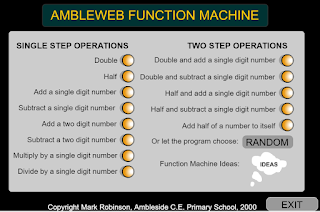
This function machine by Mark Robinson has a menu of choices for you to choose from.  


The sound effects will make it engaging and interesting for students, too.  Just stick a link to the machine in your math workshop SMART doc.  Then you will have access to it whenever you wish!

What a fun tool.  Be sure to share with your team.

Tuesday, October 4, 2016

Nix the Tricks--Use manipulatives and strategies to help students understand

One of the biggest challenges we have is to change our thinking about how we teach math. Many of us teach using the same methods and same "tricks" that were used to teach us  because this is how we feel comfortable.   Research shows that we should be working to help our students make sense of the math.  To do this, we need to work to include more concrete examples of problems and to eliminate the teaching of tricks in math.  

I found this great website called Nix the Tricks.  On this site, a high school math teacher explains how the tricks hurt students in the long run.  She also offers a free, downloadable book where she lists different tricks that teachers teach, why they shouldn't be taught, and how we should be teaching instead.

I am constantly looking for good manipulatives to use in the classroom.  This document has a list of some virtual manipulatives that can be used in all classrooms K-5.  As kids get older, we sometimes think we shouldn't be encouraging manipulatives anymore, but that is not usually true.  All students need to go through three stages with a concept: concrete, pictorial, and abstract/numerical.  They will all be in each stage for a different amount of time, so most 5th grade classrooms will still have kiddos who need to use manipulatives to help it make sense.

That's what we want.  For it all to make sense.


Share these resources with others that you think might benefit.  If you want some help with putting some of these things into action in your classroom, please let me know!

Wednesday, September 28, 2016

Helping kids develop number relationships


I heard about this app today and thought I would share!  It looks like a great extension/challenge for firsties, but also has a great way to build number sense and relationships in your other kiddos!

This is talking about the free Lite version, and I am not sure what the paid version will offer you.  If you don't have access to tablets, the concept remains the same and could be something you do in your classroom on the SMARTBoard or some other, more flexible number grid.

The basic version involves students finding a number on a blank number grid.  The trick there is that the other boxes are empty until clicked.  The child can click to help orient themselves to the grid.

In the advanced version, the student is again given a number to locate on the grid, but the orientation of the grid has been changed.  The child must use his/her knowledge of numbers in order to locate the number on the grid.  Each orientation will have 10 different numbers for students to place.  I think it would be a powerful tool for building student's problem-solving and number sense relationships!

Let me know if you would like help figuring out a way to develop a less-techy version to use in your classroom.

The following video is a student's review of the basic app.  


Saturday, September 24, 2016

Plickers--Have you tried them?


Hopefully, you have heard about Plickers.  If not, go to the website to learn more.

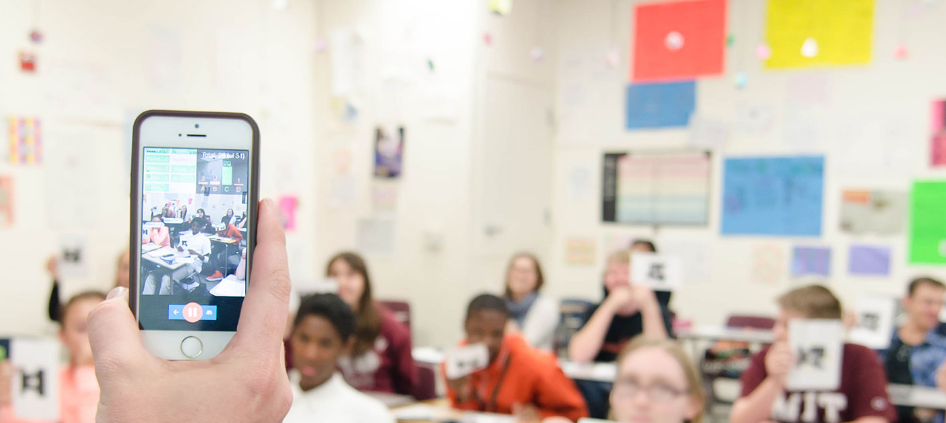
Plickers are cards that students use to respond to multiple choice questions presented by you on the SMARTBoard.  Once the child has an answer, you use your smartphone or Ipad to scan the room and "pick up" their answers.  Each person's card is individualized so that they can't compare it to someone else's for a right answer.  Individualization also helps you to see who is getting the right answer and who isn't.

The site will tell you how many had the right answer for each question both at the time and after you are done.  You feed the program the questions you want to ask.  You can ask all of the questions at once, or you can just ask one or two to get feedback on the day's lesson.

Last year, when I used this site, I emailed the Plickers people to ask if teachers could share question sets.  They told me that capability would come in the near future.  It looks like to me that it is not ready for that yet.  However, if you create a question set in word, then other people who want the questions just need to copy and paste it into their own account to use it.  Once the question set is in, the questions can be used as often as desired.

Your IMC specialist should be able to help you with this program if you would like, but I am also happy to help you figure out ways to use this in your math class.

I have made a question set for U2--4th grade, U2--1st grade, U3--2nd grade, and U3--5th grade.  You can copy and paste these into your Plicker account to use if you wish.  Good luck!

U2 Plickers--1st grade

U2 Plickers--4th grade

U3 Plickers--2nd grade

U3 Plickers--5th grade